
Nobody’s asking for a designer. Or a film crew. Or a bedroom that looks like a YouTube studio.
What you actually need is boring, in a good way: a few formats you can repeat, a hook that shows up before anyone’s thumb wins, and a folder of clips so release week isn’t “oh god I have to make something tonight.”
This is for artists with music on Spotify who want Instagram Reels that help you find new fans—not the occasional post that gets 300 views and sends nobody anywhere.
Why Reels still matter for musicians
Instagram stopped being a photo dump a long time ago. Strangers see you in the feed before they follow you. The platform cares about whether people finish the reel and save it, often more than whether they tap the heart.
Put your best 15 seconds of your song under something that moves, and you’re already ahead of the polished static post with a caption that says “new single out now 🙏”
Reels also show up when people search. Genre words in the caption, text on screen, even how you describe yourself in your bio—listeners are trying to answer a simple question: what do you sound like? Give them that in the first pass.
Going viral once is a lottery ticket. Posting often enough that someone recognizes the chorus three scrolls later—that’s the game.
Five Reel formats worth rotating
You don’t need all five. Pick two or three and cycle them. The artists who stick around aren’t the ones with the cleverest single idea; they’re the ones who didn’t quit after week two.
Open on the part you’d play for a friend in the car. Chorus, that weird vocal run, the drop—whatever makes someone go “wait, what is this.”
No logo sting. No five seconds of black screen while the song fades. You’ve already lost.
Strangers decide fast. Under two seconds, usually. This format is just you answering “might be your thing?” out loud.
Visuals can be almost anything that loops without demanding a plot: night drive footage, your desk with the interface open, a crowd from the back of the room. The audio does the selling.
Hook clip example: snippet starts at the chorus with a looping visual underneath the waveform
2. Lyric reveal
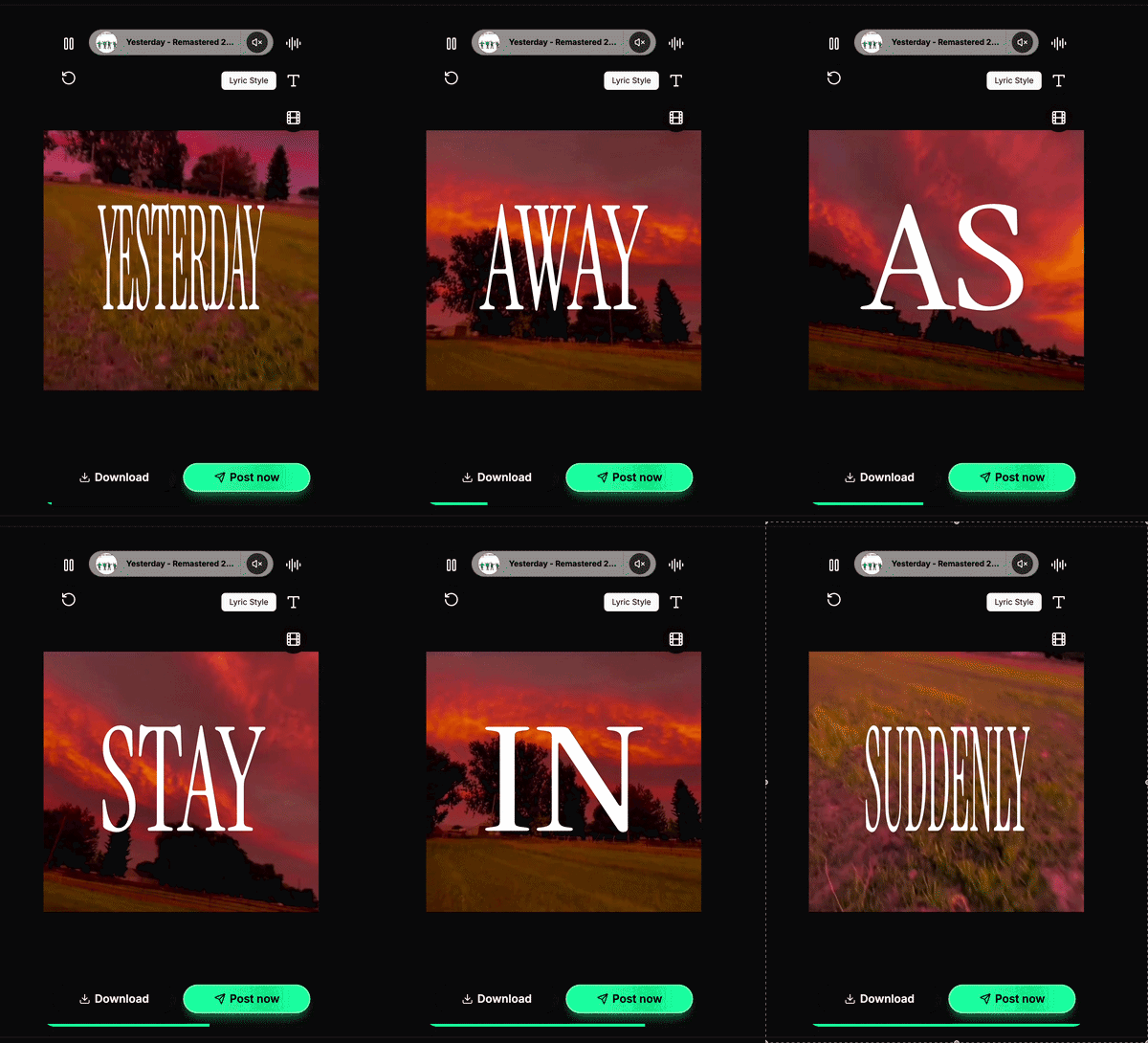
One or two lines on screen while the snippet runs. People save these. They screenshot them. They come back to read along when they’re hooked on the melody but didn’t catch the words.
Two ways to do it, depending on what you mean by “lyrics.” Actual song words, timed to the vocal—karaoke-style, line by line—need alignment, not just typing in Canva. Viral on-screen text (“POV: you finally leave the party…”) is a different beast: it’s about mood and hooks. Both work; don’t mix them up when you’re batching.
Short lines. High contrast—if you’re squinting on your phone, so is everyone else. For real lyrics, sync to the vocal. For POV-style copy, one thought per screen is enough.
3. Behind-the-scenes (BTS)
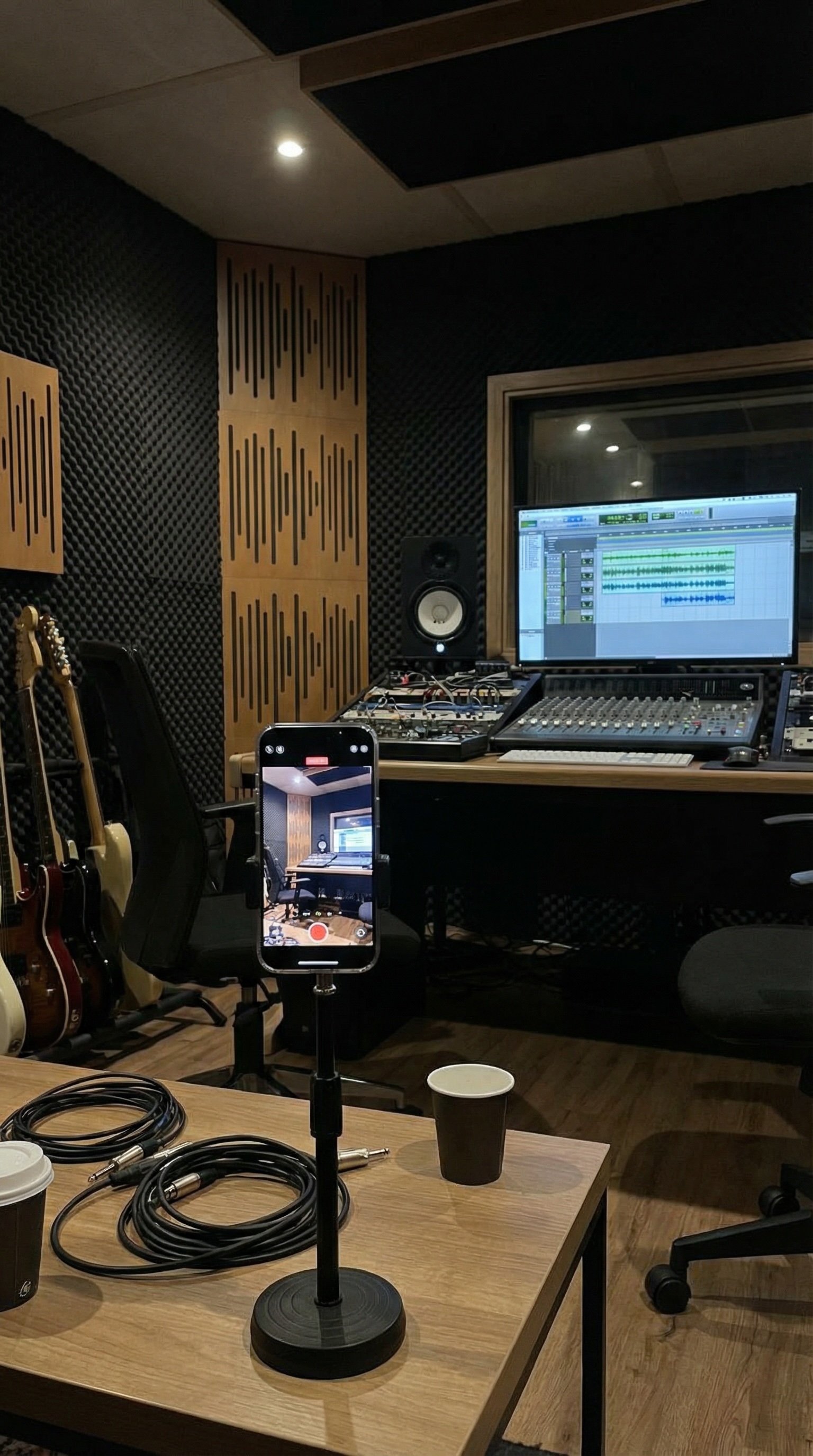
Voice note of a melody. Messy take in the booth. Screenshot of the session with 47 tracks. Walking into the studio at 11pm. Your dog on the couch while you tune.
The audio can be the same snippet you’d use elsewhere, or you talking over it. Doesn’t matter much.
Fans follow people. Tracks come and go. BTS is how you remind them there’s a human on the other side—and the messy version is often better than the “content” version.
Casual behind-the-scenes frame from a recording session
4. Loop visual (“vibe” clip)
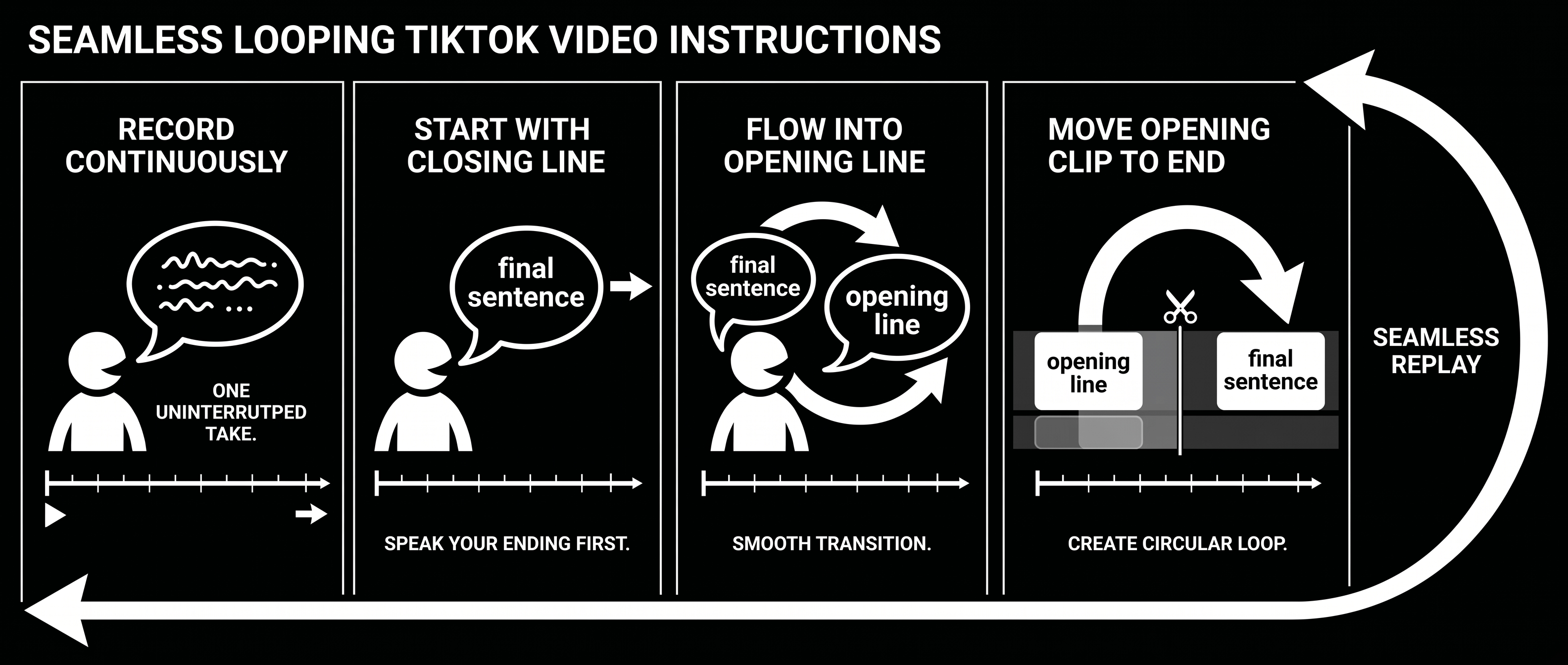
Eight to fifteen seconds. No story. Just mood. Works stupidly well for instrumental stuff, electronic, anything where the feeling is the point.
Same energy as a Spotify Canvas: vertical, looped, no narration.
Match the first and last frame on purpose. When the loop is seamless, a lot of viewers don’t clock that the Reel ended—they keep watching (or let it replay) instead of scrolling away. Instagram weights **completion rate** and **watch time** heavily; a clean loop nudges both. A visible jump at the loop point does the opposite: it signals “done,” and the algorithm treats it that way.
Fix the loop in the editor before you publish.
Seamless loop visual with a music snippet playing
5. Story in text
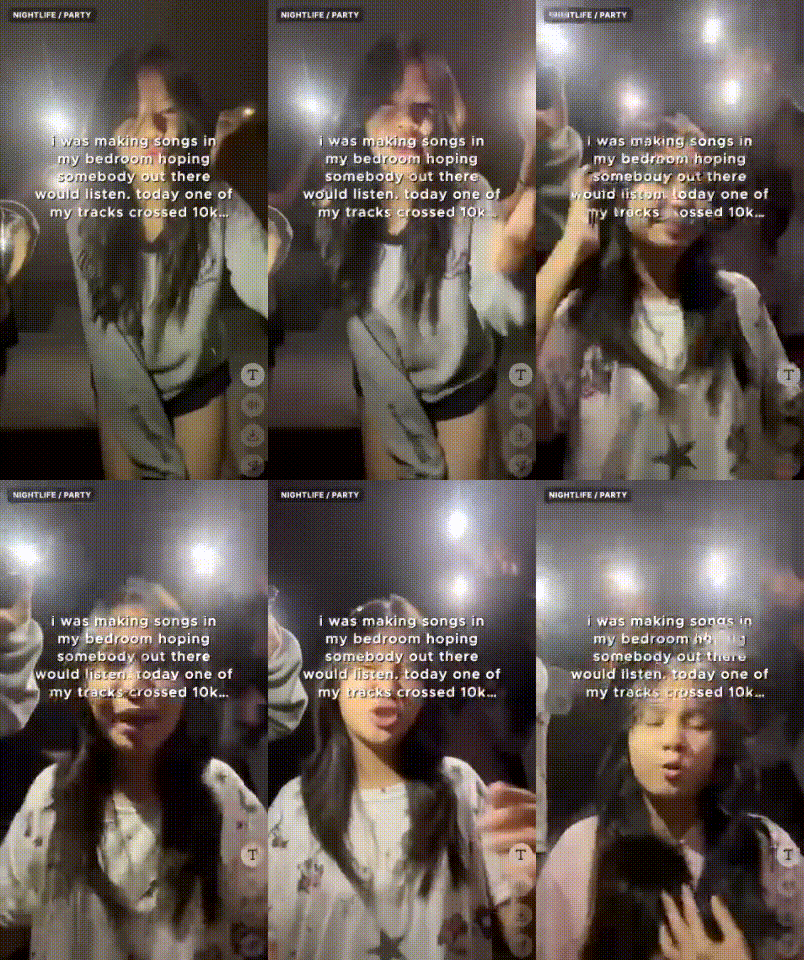
Screen text does the heavy lifting. “Wrote this on a tour bus outside Omaha, engine still running.” “Almost cut this verse. Glad I didn’t.” Song underneath.
People read first. Then they listen longer than they would’ve if you’d just dropped the hook cold.
First line has to earn the second. Under twelve words is a decent rule of thumb—not because an article said so, because thumbs are impatient. If you’re stuck, lean on confession-style hooks or POV captions—the formats people already stop for in music Reels.
Text-led reel with a short story on screen and the track playing underneath
Before you export: the stuff that actually gets ignored
| Rule | Practical target |
|---|---|
| Hook | Best moment in the first 1–2 seconds. Not after your “hey guys” energy. |
| Length | 15–30s is the sweet spot for reels right now. Pure hooks can be shorter. |
| Format | 9:16. Vertical. Every time. |
| Audio | Your own track on a Creator account when you can—fewer copyright headaches, and you want the stream path to be yours. |
| Text | On-screen copy plus the Instagram caption below the post. A lot of people watch muted in public. |
| Ask | One conversion path per Reel—not five asks in one caption. |
Trending sounds have their place. So does your own audio. Half your posts with your music isn’t a science—it’s a sanity check so your feed doesn’t only ride trends and never builds a sound people associate with you.
Batch it: track to post-ready Reels
The usual failure mode: one reel for the single, exhaustion, silence for fourteen days.
Don’t do that. Sit down once and make a small pile.
Step 1: Lock the snippet
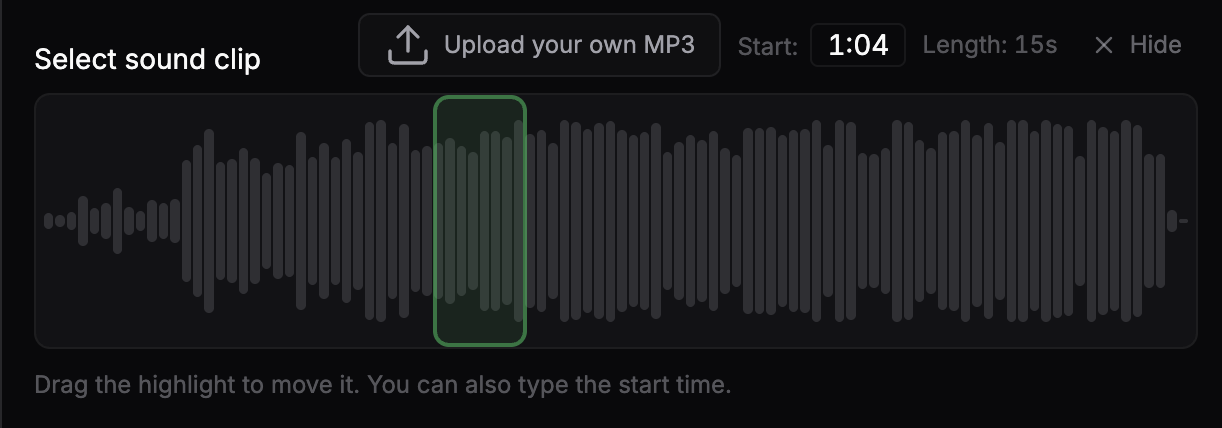
Play the song once. Where would you skip to if a friend said “just play me the good part”? That 15–30 second window—chorus, pre-chorus, whatever hits—is your default for everything else in this list.
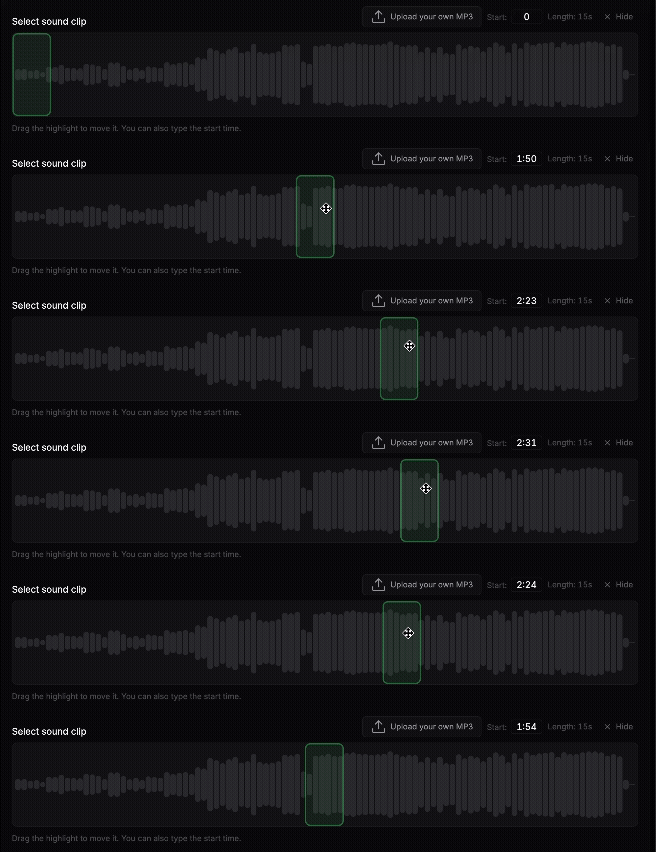
In Creative Studio you pull the track from Spotify and drag the snippet window on the waveform until it sits on that moment. Same hook, every format downstream.
Snippet selection on a waveform or timeline in a music promo tool
Step 2: Find visuals (yours or not)
Vertical footage that holds attention without explaining the song. Night city b-roll. Phone clip from a show. Cover art with a slow zoom if that’s all you’ve got.
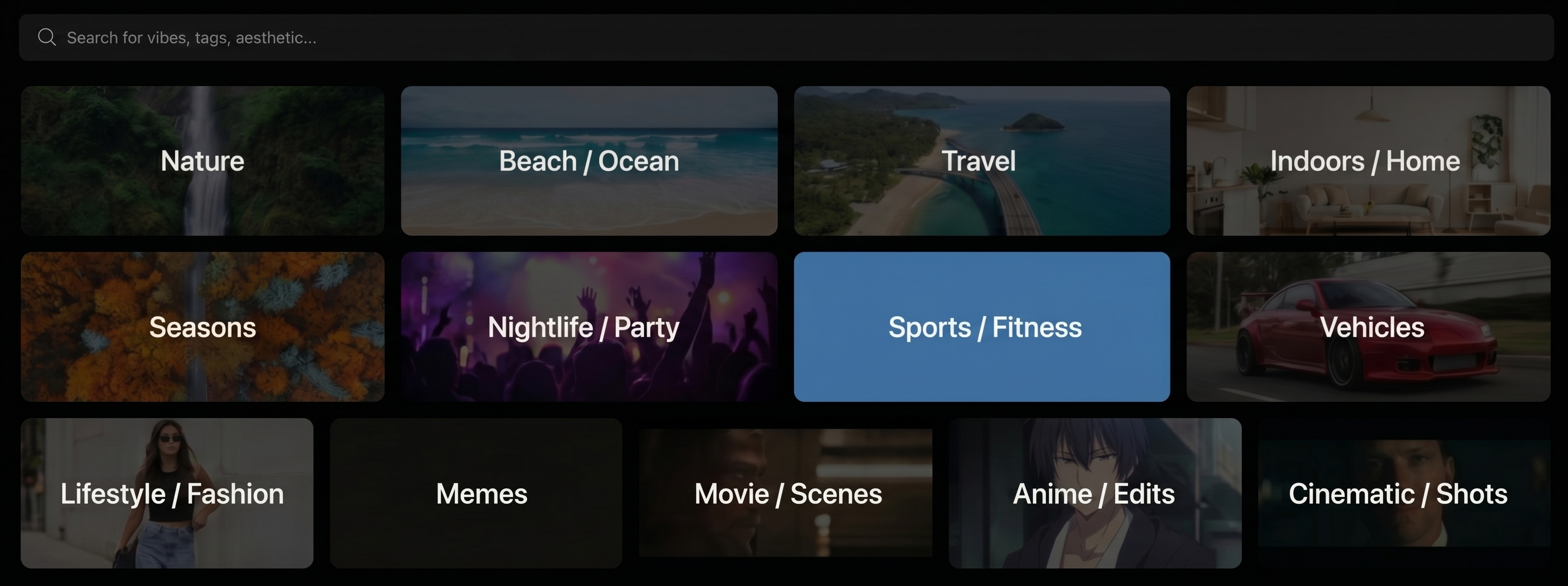
If you’re not shooting fresh footage every week, a catalog helps. Creative Studio ships with vertical background clips built for music promo—plus a Top Performers row of clips that already ran in real Soundlink campaigns, so you’re not guessing what “looks like an ad” from scratch. Browse by mood (nightlife, nature, cinematic, and similar style tags). Or upload your own MP4—vertical, roughly 10–60 seconds—and run it through the same snippet + caption flow.
Five to ten backgrounds you reuse beats fifty one-offs you’ll never touch again. Same clip, different snippet, different on-screen line—suddenly you look active.
Step 3: Write the words
Split this in your head: text burned into the video vs the Instagram caption underneath. Both matter; they’re not the same job.
For on-screen copy, pick a lane—POV, “when the beat drops…”, quick hooks, gym/night-drive vibes, hype lines, that kind of thing. Creative Studio groups those as caption presets (POV Captions, Quick Hooks, When The Beat Drops, and the rest). Pick a style and language—English, Spanish, French, German, or Italian—and you get lines from that pool, not a blinking cursor. Swap preset until something fits, tweak the text if you need to, then render.
For the Instagram caption itself, keep three angles in a notes app if it helps:
- Discovery — “slow R&B for 2am drives” (genre + mood, no essay)
- Story — one real sentence about the song
- Direct — “comment ‘____’ for the link ”
Actual song lyrics on screen—word-synced, karaoke-style—is a separate pass. Lyric Video Maker (inside Soundlink) is for that: paste your lyrics, sync them to the snippet, export. Lyric videos can take a few minutes to render; hook clips with a caption preset are usually faster. Use LVM when the reveal is the words, not when you just need a viral hook line.
Caption options or on-screen text layer on a vertical promo clip
Step 4: Export like you’ll hate yourself if you don’t
MP4, 9:16. Name files like a grown-up:
artistname_songname_hook_v1.mp4
artistname_songname_lyric_chorus.mp4
Ten exports in one sitting beats one “perfect” reel across three evenings. Perfect is the enemy of posted.
Each render queues in the background—give it a minute, then download the MP4 when it’s ready. Batch a handful back-to-back and you’ll have a folder worth posting before the week starts.
List of rendered downloads ready to post on Instagram
Step 5: A calendar you might actually keep
Monday: hook clip. Wednesday: lyric or BTS. Friday: loop or text story. Saturday if you have energy: something trend-adjacent or a collab.
Three posts a week is enough. You’re not running a TV channel.
Mistakes I see constantly
Logo intro first. Nobody waits. Sound and motion, immediately.
Only posting release day. Tease a week or two out—snippets, session footage, the lyric line you’re proud of. Release day is the spike, not the whole campaign.
Bio link that goes nowhere useful. One destination: the single, pre-save, smart link. Not a Linktree with twelve buttons and no clear winner.
Same format until people tune out. Rotate. Boring feeds kill momentum too.
Ignoring saves. A reel that gets saved is telling you something. Make two more like it with the same hook window before you chase a new idea.
Spotify to Reel without CapCut or Premiere Pro
Creative Studio is aimed at this exact grind—not Canva-style blank canvases, not a timeline you have to learn like a job.
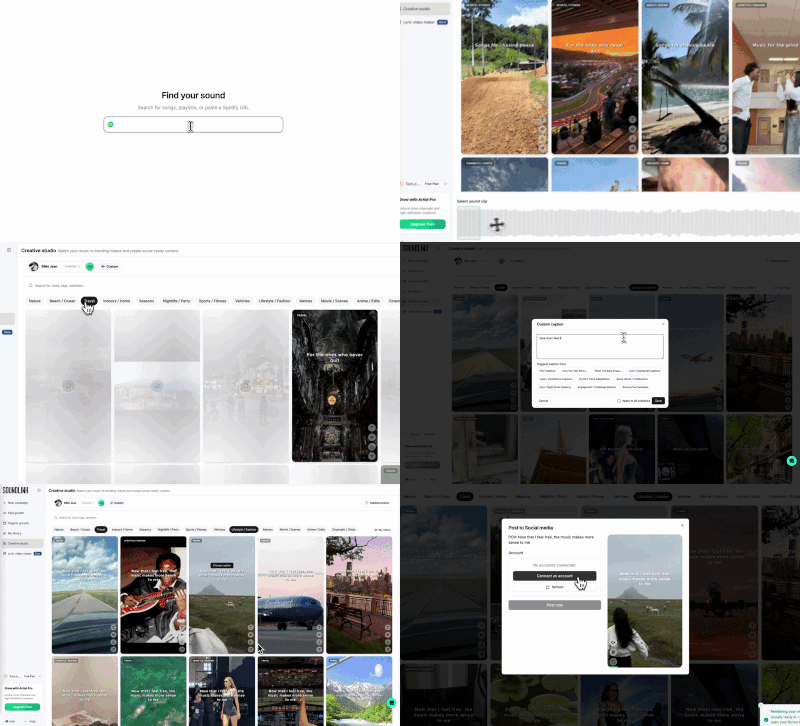
Rough flow: search your track on Spotify, set the snippet, pick a background from the library or Top Performers (or upload your own clip), choose a caption preset and language, render, download. You’re not hunting random stock sites or fighting 9:16 exports by hand.
Need synced lyrics instead of a POV line? Lyric Video Maker lives alongside it—same “track in, vertical video out” idea, but the output is aligned lyrics over the clip, not a viral caption template.
End-to-end flow: search track, pick snippet, select visual, render, and download
You still choose the hook, the mood, the line on screen. The studio just packages what musicians actually post: short audio, vertical loop, text people read in the first second.
Paid campaigns come later for most people. Get reels that work, send everyone to one link, then put money behind what already got a reaction. If you already use Soundlink for ads, that’s the natural second step—many creative variants, Spotify attribution that tracks conversions—but the order still matters: organic proof first.
Before you hit post
- [ ] Hook lands in the first 2 seconds
- [ ] 9:16, roughly 15–30s (shorter OK for pure hooks)
- [ ] On-screen text readable on a phone, not a monitor
- [ ] Instagram caption says something (genre, story)—not just hashtags
- [ ] Bio link goes to this release
- [ ] At least two more clips queued so you don’t ghost next week
If you only do one thing this week
Grab hook clip + lyric reveal. Block 90 minutes. Export six to ten files, not one. Post three times and see what gets saves.
Want to skip the assembly line, sign up for Soundlink and open Creative Studio on whatever single you’re pushing—hook clip with a Top Performers background, one POV-style caption preset, and if the song lives on the lyrics, a pass through Lyric Video Maker. See if the pile in your camera roll looks different.