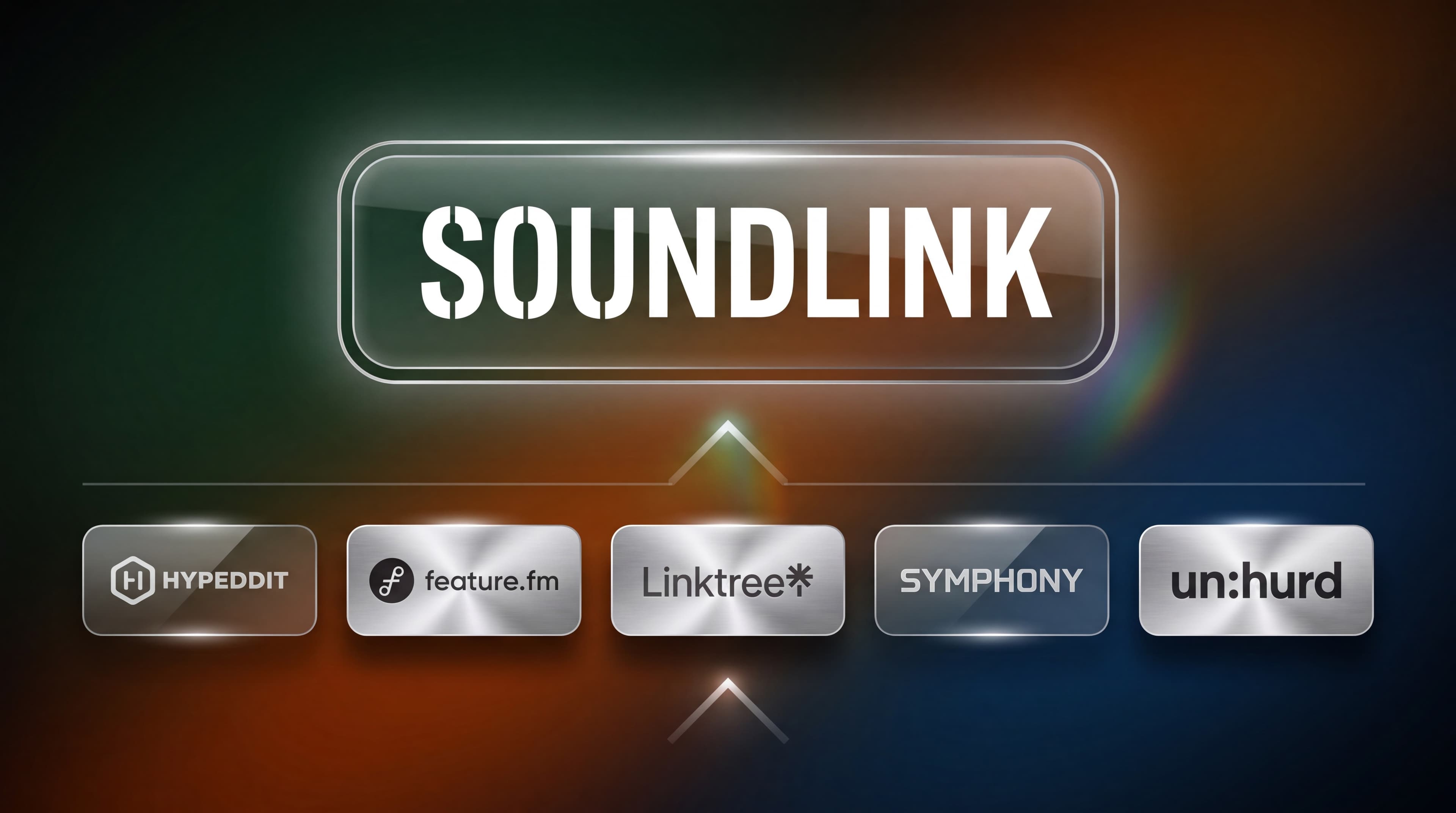

Hypeddit, Feature.fm, Linkfire, SymphonyOS, and Un:hurd all sell the same promise: run ads, send traffic through a smart link, watch the numbers go up. Their dashboards report visits, click through rates, destination splits, and geographic breakdowns. All of it is real data. None of it answers the question a label or manager needs answered before the next budget decision.
The gap is not a bug in any one platform. It is a structural limit in how streaming attribution works when the destination is a platform you do not own. This post covers what these tools actually record, where the measurement stops, and what a campaign level decision requires instead.
TL;DR
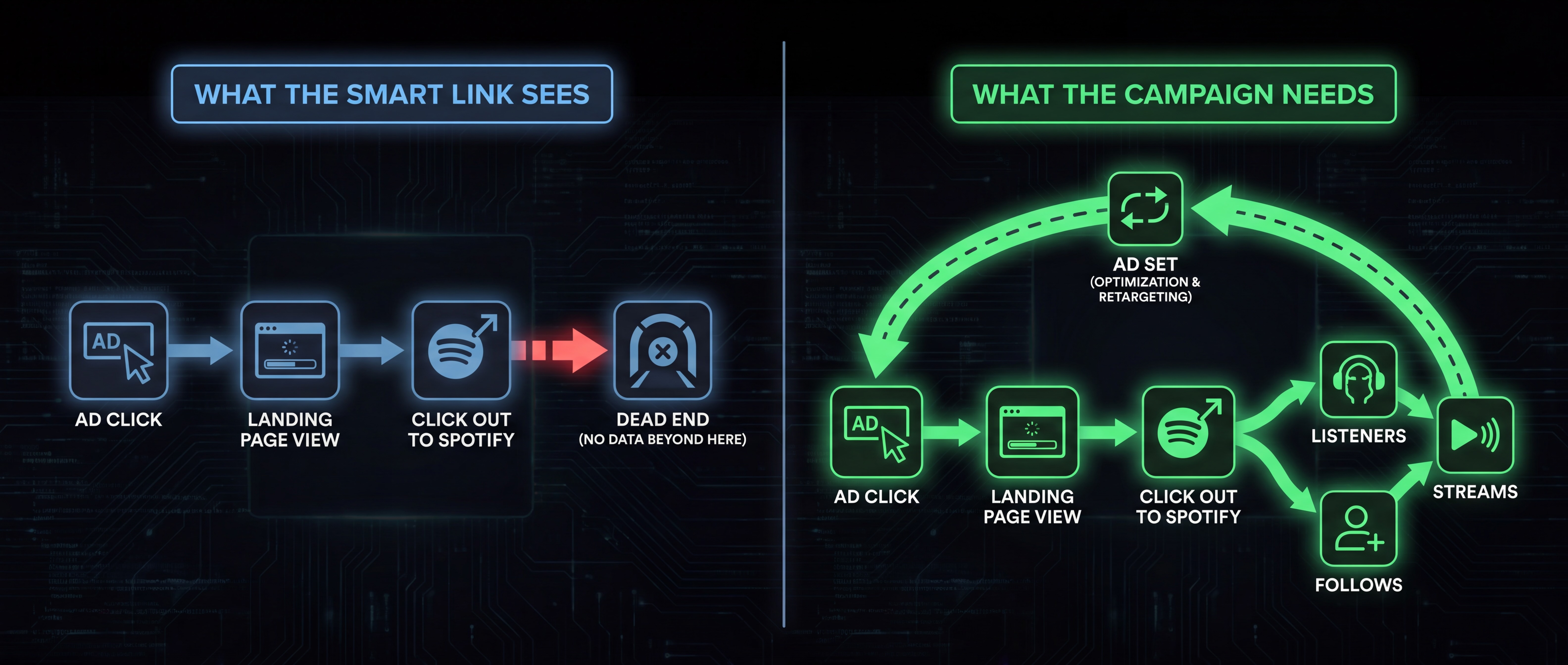
Hypeddit, Feature.fm, Linkfire, SymphonyOS, and Un:hurd measure the click out to Spotify. They do not measure what happens after it. Their reporting covers visits, click through rate, and destination platform splits, which describe traffic behavior on a page you control. It does not cover listeners, follows, saves, returning listeners, or streams attributed back to a specific ad set, because those events occur on Spotify. Music attribution at ad set level requires Spotify side measurement, not a better landing page.
What a Smart Link Actually Records
A smart link is a landing page you own. That ownership is exactly what makes tracking possible, and exactly what caps it.
Because the page is yours, you can fire the Meta Pixel on it, pass events through the Conversions API, and record every session in the platform’s own database. That produces a well defined set of metrics:
- Visits: Sessions that reached the landing page.
- Click through rate: The share of visits that clicked a destination button.
- Destination split: How many clicks went to Spotify, Apple Music, YouTube, and so on.
- Traffic source: Referrer data, plus UTM parameters where the platform supports them. Hypeddit uses its own
hypesourceparameter for this. - Geography, device, and browser: Standard session attributes.
Most platforms also allow filtering these by ad and ad set, which is genuinely useful. It tells you which audience produced the cheapest page arrivals.
The dataset is complete and accurate for what it covers. It ends at the moment the user leaves.
The Click to DSP Is Not the Conversion
The destination click is the last event a smart link can observe. Everything a music campaign is actually buying happens after it.
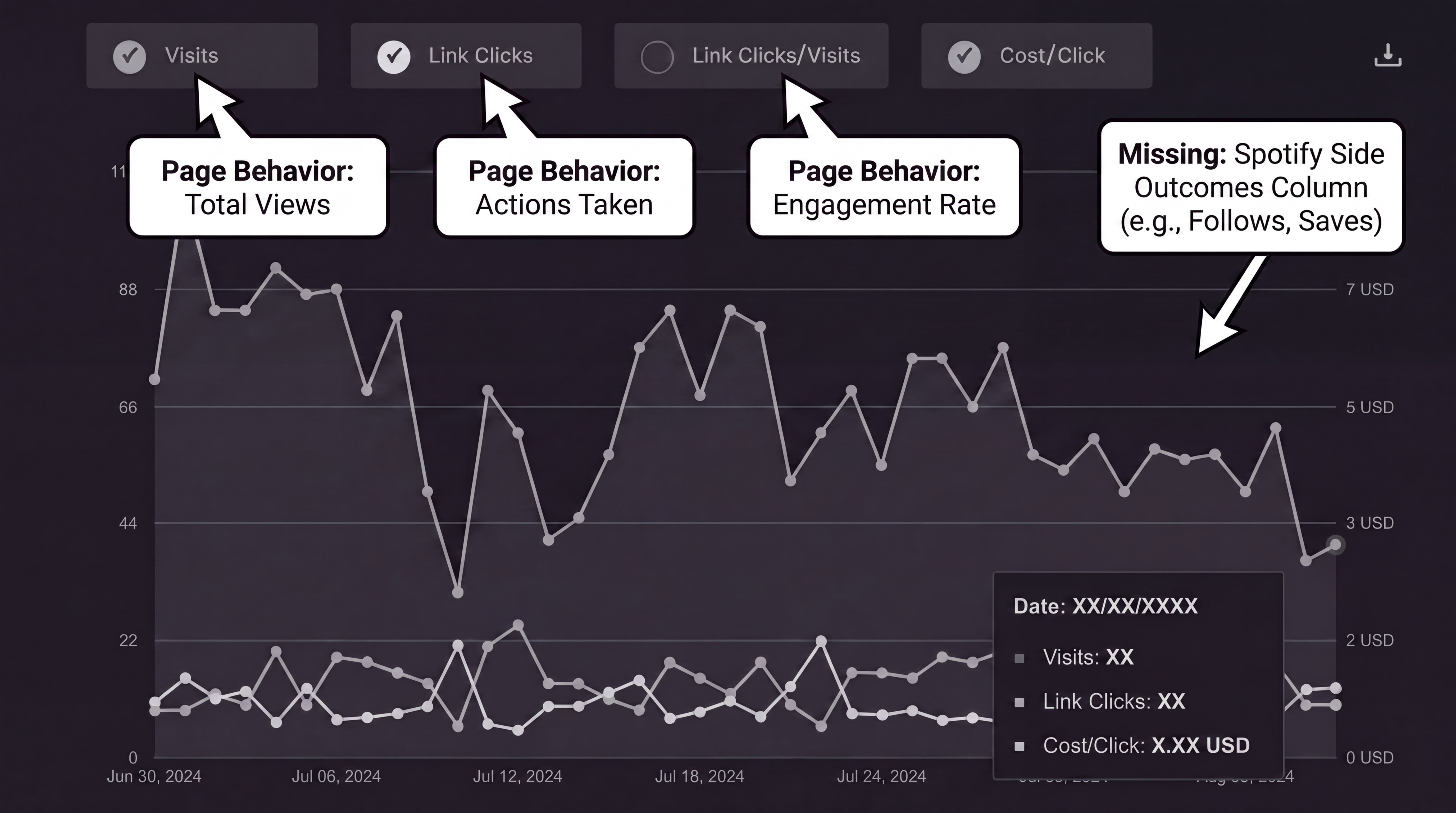
Spotify is a third party destination. You cannot place a pixel on it, and it does not pass conversion events back to Meta. When the handoff to the Spotify app occurs, UTM parameters are stripped and the session ends. The person may open the app, press play, skip after four seconds, save the track, follow the artist, or never load the app at all. The smart link records the same single event in every one of those cases.
A landing page click-through and a listener are different units. Reporting one and calling it the other is the most common measurement error in music marketing.
Drop off between the click out and the stream is not marginal. It varies by market, device, placement, and whether the user already has Spotify installed. Because that drop off rate is unmeasured, it cannot be corrected for, which means click volume is not a stable proxy for stream volume across campaigns.
This is why two ad sets with identical cost per click routinely produce different listener counts, and why the conversion events firing on the landing page will report them as equally successful.
Where Pre Saves Are the Exception
One event does cross the boundary, and any accurate comparison needs to acknowledge it.
A pre save requires the listener to authorize a connection to their Spotify account. That authorization is a confirmed action on the Spotify side, not a landing page proxy, and platforms that offer pre saves can report those counts accurately.
Two limits apply. Pre saves are available only in the release window, so they cover a narrow slice of the calendar and nothing in catalog campaigns. And a pre save count is a total, not an attribution. It confirms the action occurred without tying it to the ad set, creative, or market that produced it, unless the platform carries campaign level identifiers through to the reporting layer.
Practical read: pre save volume is a real Spotify side signal. It is not a substitute for ongoing measurement, and it will not tell you which of your six ad sets to scale.
Four Questions Click Data Cannot Answer
For a marketer managing multiple releases across multiple artists, the reporting gap shows up as four specific unanswerable questions.
Which ad set produced listeners and not only clicks
Ads Manager ranks ad sets by cost per landing page view or cost per link click. The attribution layer ranks them by click through rate. Both rank the same ad sets in roughly the same order, and neither ranking is derived from listener data. Scaling on that ranking allocates budget toward the audience most willing to tap, which is not the same population as the audience most willing to listen.
Which creative drove saves
Saves are the strongest engagement signal Spotify weights for Release Radar, Discover Weekly, and personalized playlists. Creative testing without save level attribution optimizes for thumb stopping performance and stops there. The creative that wins on click through rate is frequently not the creative that wins on saves.
Which market is worth scaling
Cost per click in tier two and tier three markets is often a fraction of tier one. Cost per listener frequently is not, because app install friction and intent both differ. Geographic scaling decisions made on click cost alone systematically overweight cheap traffic markets.
Which audiences produced returning listeners
This is the question with the widest gap between what operators need and what any dashboard reports.
A listener who plays a track once and never returns and a listener who comes back across the catalog are worth different amounts, and acquisition cost should reflect that. Repeat engagement is also what Spotify’s recommendation systems weight when deciding whether to widen distribution through Release Radar, Discover Weekly, and Autoplay.
Spotify for Artists does report repeat behavior. Audience segments and streams per listener are both visible there, so it would be wrong to say the data does not exist. What is missing is the join. Those segments are reported for the artist as a whole, with no breakdown by acquisition source, so there is no way to see that one audience produced listeners who returned twice while another produced listeners who never came back.
The smart link side cannot supply that join either, because it stopped recording at the click out. An operator running six ad sets can see which produced the cheapest traffic and, with Spotify side measurement, which produced listeners. Seeing which produced listeners who came back requires engagement tracked over time and tied to the ad set that acquired them.
What Campaign Level Measurement Requires
Closing the gap requires three components working together. The full technical breakdown is covered in our guide to tracking Spotify streams from Meta ads. In short:
A tracked entry point with correct pixel and CAPI configuration. Browser side events alone lose meaningful volume on iOS under ITP and ATT. Server side redundancy is not optional.
Conversion events tuned to music behavior. If the pixel fires one generic event for a page view, a click out, and a pre save, Meta optimizes toward whichever is cheapest to produce. That is almost always the shallowest one.
Spotify side measurement that goes beyond landing page proxies. Without a confirmed outcome signal from the streaming side, every downstream metric is a restated click.
The first two are configuration. Platforms in this category handle them competently. The third is a different category of capability, and it is where the field separates.
How Hypeddit, Feature.fm, Linkfire and Other Smart Link Platforms Compare
The table below reflects publicly documented functionality as of July 2026. Feature sets in this category change frequently.
What each platform does
| Platform | Primary function |
|---|---|
| Hypeddit | Smart links, download gates, ad automation |
| Feature.fm | Smart links, pre saves, artist hub |
| Linkfire | Link management and analytics for labels |
| SymphonyOS | Automated advertising and fan CRM |
| Un:hurd | Playlist pitching and automated ads |
| Soundlink | Paid campaign management with Spotify side attribution |
Click and destination analytics
| Platform | Reporting |
|---|---|
| Hypeddit | Yes, filterable by ad and ad set |
| Feature.fm | Yes |
| Linkfire | Yes, detailed destination reporting |
| SymphonyOS | Yes |
| Un:hurd | Yes, delivered as periodic reports |
| Soundlink | Yes |
Spotify listeners, follows, saves, and returning listeners attributed per ad set
| Platform | Reporting |
|---|---|
| Hypeddit | No |
| Feature.fm | No |
| Linkfire | No |
| SymphonyOS | No |
| Un:hurd | No |
| Soundlink | Yes |
The pattern in that final column is the point. Five of these platforms are competent at what a smart link can do. The distinction is not quality of execution within the category. It is whether the reporting layer extends past the click out at all.
How Soundlink Reports Spotify Side Outcomes
Soundlink runs paid campaigns on Meta for a Spotify track or playlist, and reports outcomes on the Spotify side of the click rather than the landing page side.
The platform handles pixel and CAPI configuration, sets conversion events appropriate to music behavior, and applies attribution windows suited to delayed Spotify engagement. Reporting combines Meta delivery data with Spotify engagement in one view, calculated by actual data rather than reverse engineered from two dashboards that do not reconcile.
The metrics that result are the ones budget decisions actually run on:
- Cost per listener (CPL): Spend divided by net new listeners.
- Cost per follower (CPF): Spend divided by new followers, the signal weighted most heavily by Spotify’s recommendation systems for artist growth.
- Cost per stream (CPS): Spend divided by attributed streams.
- Attributed streams: Stream volume tied back to campaign spend.
- Returning listeners: Listeners who came back after the first play, tied to the ad set that acquired them.
Because these are reported per ad set, the scaling decision stops being an inference. The ad set with the lowest cost per listener is visible directly, including the cases where it is not the ad set with the lowest cost per click. This data is tracked all the way to individual creatives in the ad set.
Returning listeners is the metric with no equivalent anywhere else in the stack. Spotify for Artists reports repeat behavior for the artist as a whole. Ad platforms report the click. Neither connects retention back to the audience that produced it, which is the difference between knowing a campaign generated plays and knowing it generated fans.
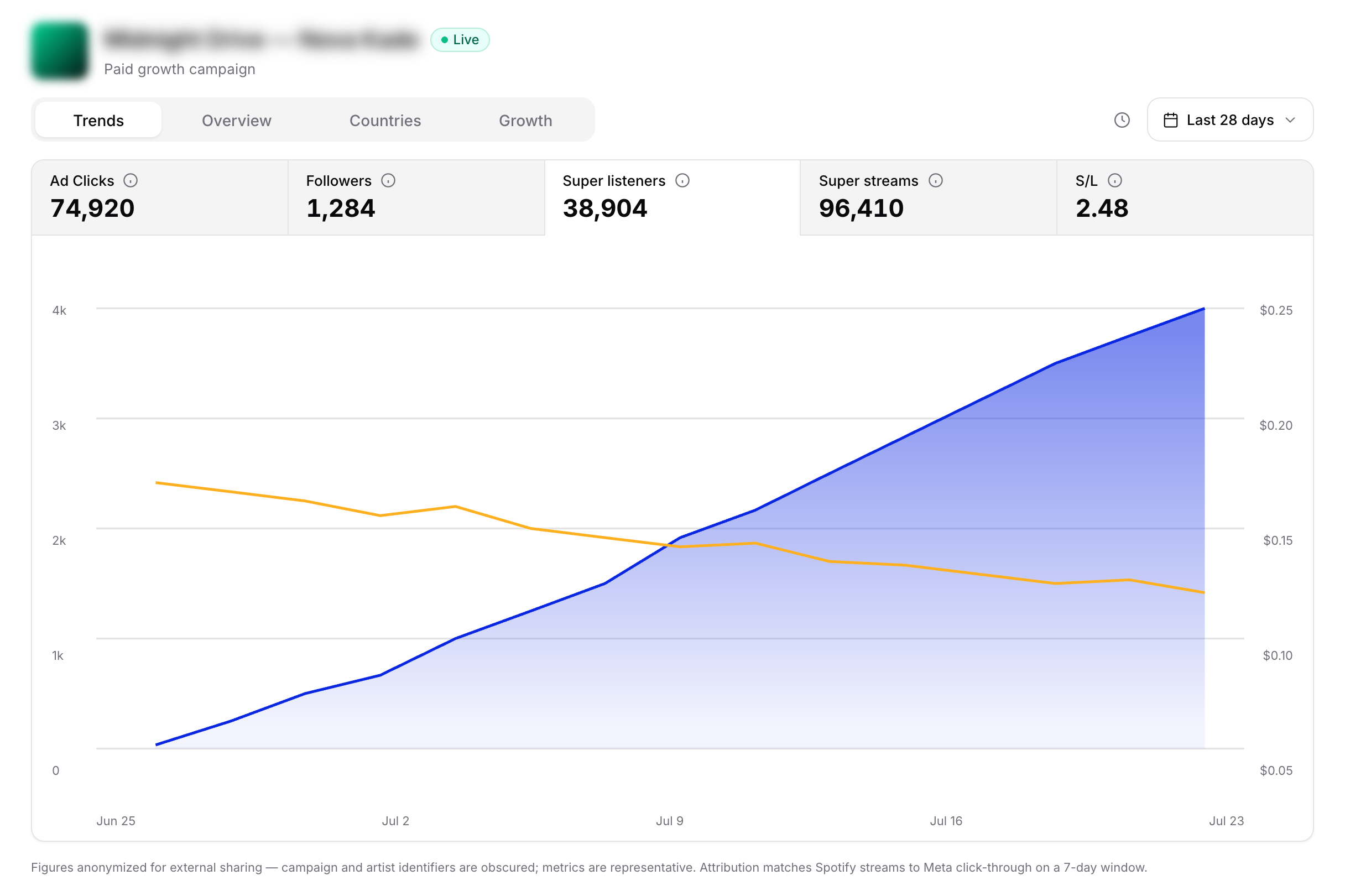
Soundlink essentially combines Meta ads and Spotify for Artists data. By tracking conversions through to Spotify, we’re able to provide data no other reporting tool can.
Frequently Asked Questions
Does Hypeddit show how many Spotify streams came from my Meta ads?
No. Hypeddit reports landing page metrics: visits, click through rate, destination clicks, traffic source, and device and geographic breakdowns, filterable by ad and ad set. Those figures describe behavior on the Hypeddit page. Stream and listener counts occur on Spotify and are not attributed back to individual ad sets.
What is the difference between a smart link and an attribution platform?
A smart link is a landing page that routes traffic to streaming destinations and records the click. An attribution platform includes that entry point but adds conversion measurement on the streaming side, so ad spend can be tied to listeners, follows, and saves rather than to clicks.
Can Feature.fm or Linkfire report Spotify listeners per ad set?
Not as published. Both provide detailed click and destination analytics, and Linkfire’s reporting is built for label scale link management. Neither documents attribution of Spotify listener, follow, or save events back to a specific ad set.
Do pre save counts prove a campaign worked?
Pre saves confirm a real Spotify side action, which makes them more meaningful than a click out. They are limited to the release window and are typically reported as a total rather than attributed to the ad set that produced them, so they validate the campaign without directing the optimization.
Can I see which ads produced returning listeners?
Not from ad platform or landing page data, and not from Spotify for Artists. Spotify for Artists reports audience segments and streams per listener for the artist as a whole, with no breakdown by acquisition source. Tying repeat engagement back to the ad set that acquired the listener requires Spotify side measurement carried over time.
Which platform should a label use to measure Meta ads driving Spotify?
The requirement is Spotify side outcome reporting at ad set level. Any platform whose deepest metric is a destination click will support campaign execution but not budget allocation across ad sets, creatives, or markets.
Is click through rate a reliable proxy for streams?
No. The drop off rate between the destination click and a stream varies by market, device, placement, and whether the listener already has the Spotify app installed. Because that rate is unmeasured, click through rate cannot be converted into an expected listener count with any consistency across campaigns.
Can I calculate cost per listener manually from Spotify for Artists?
Only at a total campaign level, and only when no other traffic source is active. Spotify for Artists reports aggregate listeners without a source breakdown for external ads, so dividing spend by the listener delta attributes organic growth, editorial placements, and playlist adds to the campaign as well.
Every platform in this category executes the click side of the funnel well. The measurement decision is not about which landing page performs better. It is whether streaming attribution stops at the click out or continues past it, helping users optimize and scale with more confidence.